


isolved RELEASE
March 20, 2026

Release v12.4 has some exciting new additions!
We are working hard to provide the best tools for you and your team.
IMPORTANT: Items listed in the upcoming release notes are subject to change.
In this release:
- Payroll: Employer 2026 Recalculation Report
- Benefits: Secure 2.0 – HPI Automation
- Applicant Tracking System (ATS): eForm Dashboard Enhancement, Cronofy Scheduling Links in Emails
- Tax: US forms updates Iowa, Maryland, and Massachusetts
- Sneak Peak: 2Q-3Q updates scheduled
Payroll
Employer 2026 Recalculation Report
Employers can now access a side-by-side comparison report of previously calculated FLSA Overtime Premium amounts versus recalculated amounts — making it easy to identify any variances that may require adjustment for 2026.
The report covers all checks dated January 1 through March 5, 2026, and includes check-level detail with key columns for Estimated Overtime Premium, Estimated Overtime Premium Recalculation, and a Difference column to quickly surface any gaps.
Key Columns
- Estimated Overtime Premium – The amount previously calculated
- Estimated Overtime Premium Recalculation – The updated amount based on the revised FLSA OT Premium calculation and/or changes to FLSA OT Premium memo accumulators
- Difference – Recalculated amount minus the original, surfacing any variance that may warrant an adjustment
Note: Employers who have already made manual adjustments or overrides to FLSA OT Premium amounts should review those independently, as they will not be automatically reflected in this report.
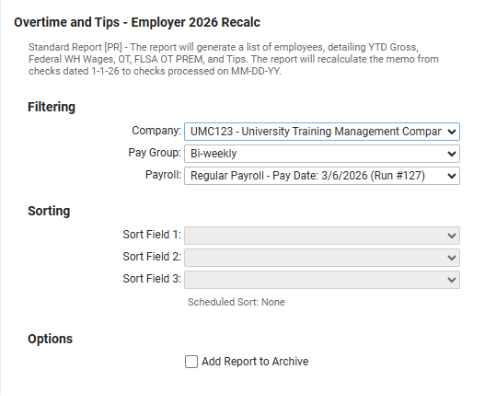
- The Overtime and Tips – Employer 2026 Recalc report can be filtered by company, pay group, and payroll run to generate a targeted comparison of FLSA Overtime Premium amounts.
Benefits/HR
Secure 2.0 – HPI Automation Added to isolved
This applies to: All clients with a 401(k)/457(a)/403(b) retirement plan in isolved.
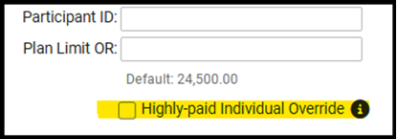
Reminder: With the update released on 2/6 to comply with the Highly Compensated Individuals (HPIs) requirements under SECURE 2.0 Section 603, the system will automatically move catch-up contributions to a separate deduction that is setup as HPI Roth if the employee had over 150,000 in wages in 2025. If no wages are loaded in the system for 2025, clients will be required to add overrides for those employees who made greater than 150,000 in wages to have the automation occur. This override can be added under Employee Benefits > Benefits > Deferred Comp > Highly-Paid Individual Override.
***Birth date addition update needed
Applicant Tracking System (ATS)
eForm Dashboard Enhancement:
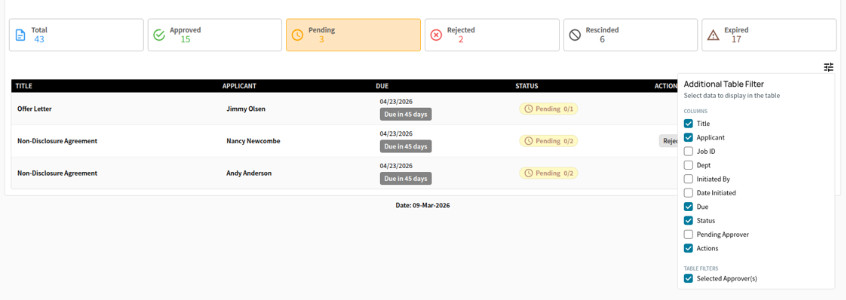
We’ve expanded the eForm Dashboard to give Admins and Authorized Managers a powerful, centralized view of every eForm in progress – no more digging through emails, individual records, or chasing approvals. This enhanced dashboard delivers realtime visibility into approval status, current approvers, pending actions, and overdue tasks, all from one location. With intuitive filters, visual approval progress indicators, and quick access to each eForm, users can spot bottlenecks instantly and keep hiring workflows moving smoothly. It’s a faster, clearer way to manage offer letters and other critical documents.
Note that appropriate permissions must be granted to users; otherwise, this will be automatically enabled for premium accounts with eForms enabled. This will be released on March 18th, 2026.
- A notification will appear on the eForm Dashboard if action is required. View by eForm status on the tabs indicated – approved, pending, rejected, rescinded, expired.
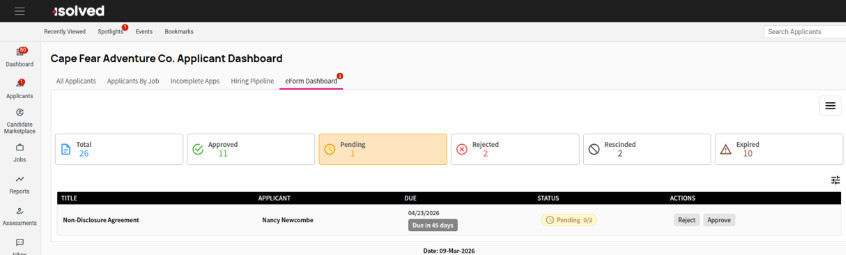
- Select title to view eForm details. Click on the applicant’s name to view application details.
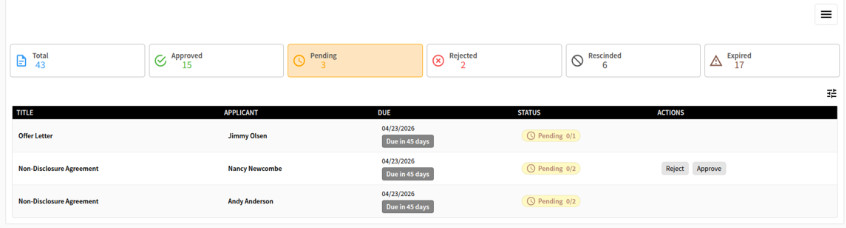
- Filtering & Customization: Open filters to view all eForms to filter by job, specific approvers, eForm initiators, and department. Customize columns for additional information.
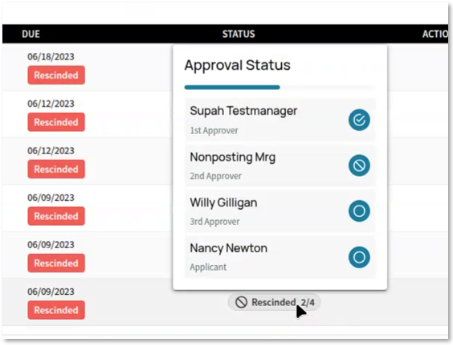
- To view additional approval status information, hover over the eForm status. The status icon indicates the approver’s action/status.
Cronofy Scheduling Links in Emails
Effortless Interview Scheduling—Now Right from Your Inbox
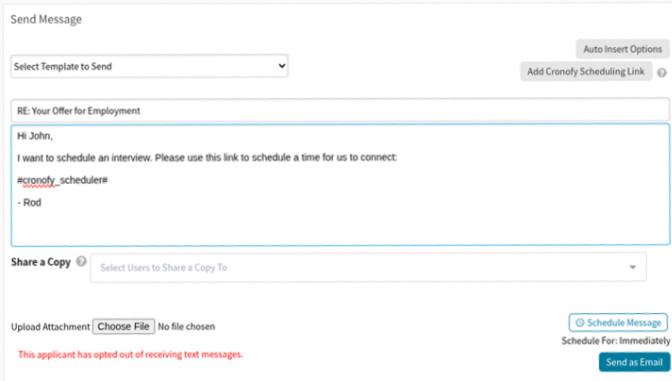
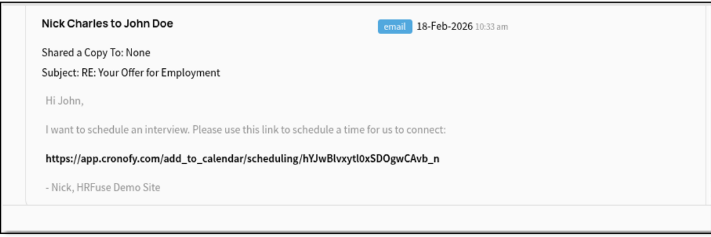
We’re excited to share that you can now insert Cronofy scheduling links directly from the ATS Communication Inbox. This enhancement makes it simple to share personalized scheduling links with applicants—helping your team streamline communication and eliminate extra scheduling steps.
Once a Cronofy template is configured in the associated job listing, the Cronofy scheduling link can be utilized in your Inbox. From there, you can add a unique scheduling link to any email with a single click, keeping your workflow smooth, efficient, and in one place.
Tax
US Form Updates:
Federal: Publication 505 Updated for 2026
- Iowa: Form IA W-4 tax parameter value – Employee Withholding allowance Certificate
- Maryland:
- Form MW507-Employee’s Maryland Withholding Exemption Certificate
- Form MW507M-Exemption from Maryland Withholding Tax for a Qualified Spouse of a Serviceman
Massachusetts: Form M-4 – Massachusetts Employee’s Withholding Exemption Certificate
Tax
2Q-3Q – Release dates TBD as developers are actively building features and testing
- Copy Employee Messages: Highly requested functionality to assist with managing communications more efficiently.
- Guided I-9 EE Document Upload: Guided workflow for employees to upload I-9 documents, reducing errors and streamlining compliance verification.
- Document Task To do: Integrated document task management enabling to-do workflows directly within HR workspaces.
- Login User Admin: Adding additional columns to view/remove passkeys, authenticator app directly from identity employee list.
- Perfect Payroll Assist: AI-powered insights panel in payroll entry that identifies payroll liability trends, anomalies, compliance issues, and items needing review before processing.